
Every project on one screen
Once you have more than three projects, the question is no longer about one project's details. It is which of them needs your attention right now. The Business plan's portfolio view is an aerial view — not a magnifying glass.
Red flags stand out immediately
Every project carries a health score and signals. You do not have to click through eight projects one by one to work out where the problem is.
Health score
On track, Watch, At risk and Blocked show at a glance which project needs intervention.
Summary at the top
Counters across the top: Total, On track, Watch, At risk, Blocked, Recurring.
Signals
Overdue tasks and risks show as signals on every project row — intervention before the crisis, not after.
Progress, deadline, value
Progress, deadline, value and last-modified time on every row; "Manage" opens the project page.
Projects are not independent of each other
One delay usually propagates. The portfolio shows where the problem is, and cross-project dependencies show who else it affects.
- High risks in the portfolio
High-scoring risks feed into a project's signals and the portfolio view — the most exposed projects stand out.
- Cross-project dependencies
On each project you record what it depends on (blocking, information or resource dependency) and which projects depend on it.
- Resources and audit
Next to the portfolio, the Management menu has resource planning and an audit timeline of significant changes, decisions, risks and approvals.
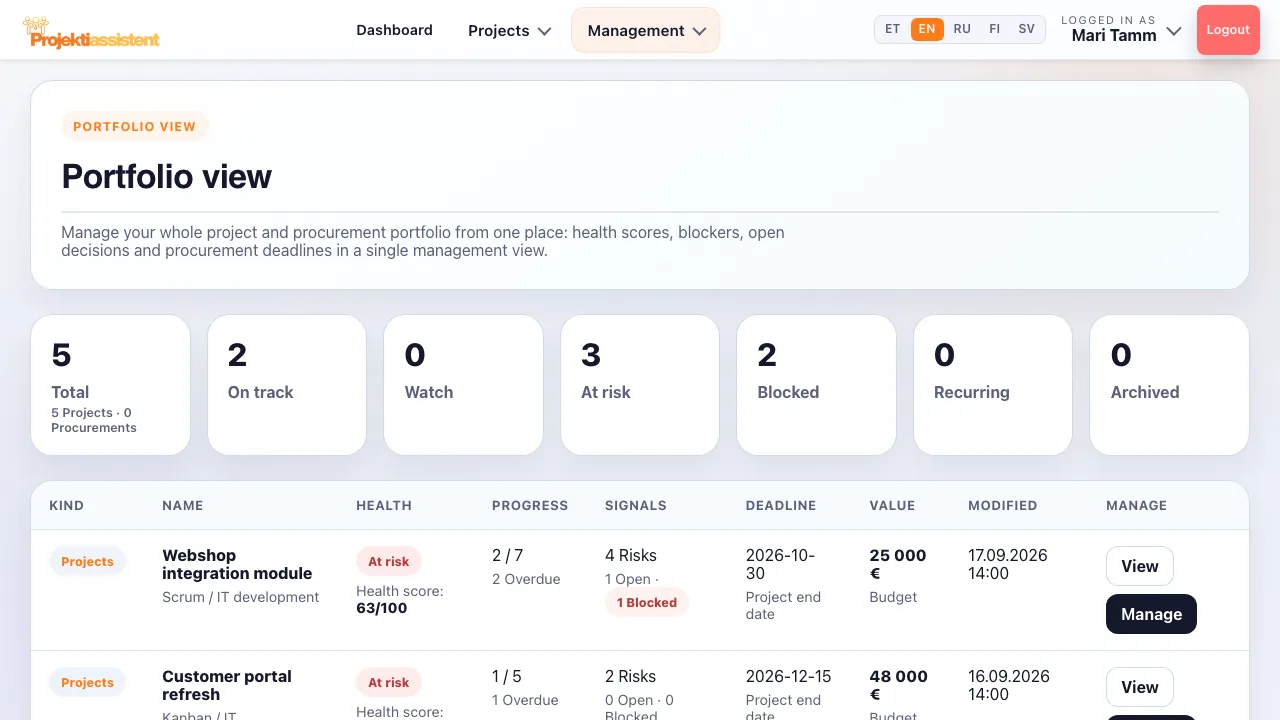
The view management asks for
"How are the projects going?" should not be answered by spending an hour assembling slides. Use the portfolio in leadership meetings: start with the projects marked At risk and Blocked.
Frequently asked questions
What is project portfolio management?
Portfolio management means looking at several projects at once through the same indicators: health, progress, deadlines, risks and resources. The point is not managing each project in detail but seeing which project needs intervention and where to put money and people next.
How is the health score determined?
It is derived from the project's data — progress, deadlines and signals such as overdue tasks and risks. Projects fall into On track, Watch, At risk and Blocked.
Which plan includes the portfolio view?
The portfolio view is on the Business plan (Management menu), together with resource planning and audit and compliance. These menu items are not available on Standard or during the trial.
Is the portfolio suitable for a PMO?
Yes — it is the core PMO view. Business-plan workspaces keep an organisation's or department's projects and members together, and role profiles limit which modules each person can see.
Are recurring projects shown separately?
Yes, recurring projects have their own counter at the top of the portfolio. A recurring workflow — the next cycle cloned from the project or a template — can be set up on every plan.
How do I do this in the app?
Step-by-step instructions with the button and field names are in the user guide.
What Projektiassistent does for you
Project plan generator
Describe the project in your own words — the AI drafts a structured plan.
→🛑Decision readiness
Decision log, baseline and milestone approvals — who, what and when.
→🧩Tasks and work breakdown
Break the project down: tasks, subtasks, owners and effort.
→📊Gantt chart
Schedule, dependencies and critical path — built from your plan.
→🔀Kanban board
Task flow in columns — the same tasks as in the plan.
→🧭Methodologies
Waterfall, Scrum, Kanban, Hybrid, PRINCE2 or Simple project.
→👥Resource planning
Who is overloaded and who is free — before a deadline slips.
→⚠️Risk analysis
Risk register: impact × probability, risk score and mitigation plan.
→💶Project budget
Cost lines, VAT and free balance in real time — ready for reporting.
→📊Reporting
A status summary for management in seconds, the document as PDF/DOCX.
→🤝Team collaboration
Share the project by invitation — Viewer, Editor or Admin.
→🧠AI project manager
Plan, tasks and summary — recommendations, what-if and notes on Business.
→🔌Integrations
API tokens, webhooks, Slack, Teams and a calendar feed (Business).
→🔒Security and GDPR
Access control, encrypted transport and GDPR rights.
→See the whole portfolio on one screen
14-day free trial — no credit card required.
Start for free →