
A project you can actually decide on
A good-looking plan and a decision-ready plan are not the same thing. Projektiassistent keeps a record with the project of what was decided and who approved it, locks the agreed schedule as a baseline and automatically highlights delays, high risks and blockers — so the decision-maker sees what is still unresolved.
Four things that make a plan decidable
These tools live in the "Planning control" and "Governance and recurring workflow" blocks of the project page and are available on every plan, including the trial.
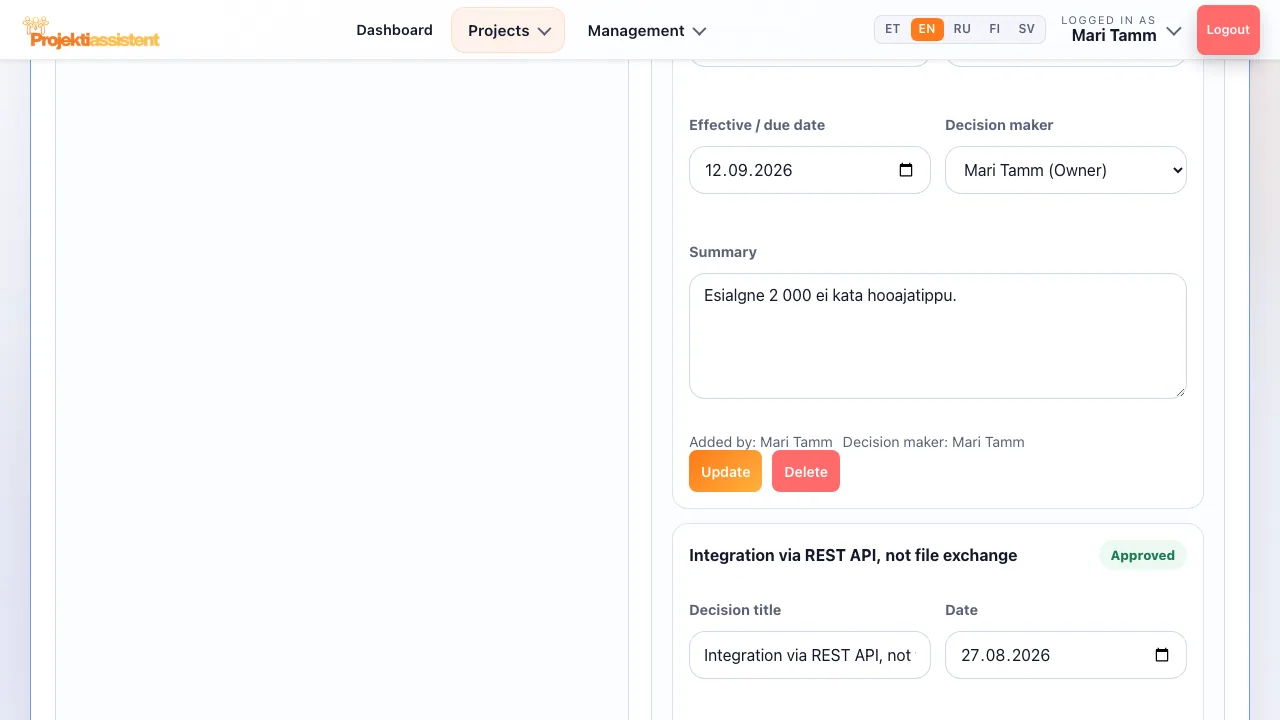
Decision log
Decision title, date, status (Open, Approved, Rejected, Superseded), impact area, decision-maker, effective date and an explanation of why it was decided.
Milestone approvals
Add a milestone with a due date and a related task. The approver presses "Approve" or "Reject" — the system records the approver and the time.
Baseline
Locking the agreed schedule: it stores task dates and planned hours. From then on you see slips and scope growth against the baseline.
Attention signals
An automatic block highlights overdue tasks, high risks and blockers — what the decision-maker needs to see first.
Who decided what, when and why
When those questions come up a month later, the answers are there. The decision log ends the "but we agreed…" arguments and makes an audit easier.
- Cross-project dependencies
Record what the project depends on (e.g. blocking, information or resource dependency) and see which projects depend on it.
- Critical path
See the tasks that determine the final deadline, the projected end and each task's slack — before you decide on a deadline.
- Versions and audit (Business)
On the Business plan you see which fields each version changed, can restore an earlier version, and the audit log shows major changes with who made them and when.
Checkpoints that move with the project
A baseline is not a one-off snapshot: the "Baseline shifted" and "Scope increased" badges appear in the task list and the Gantt chart as soon as the plan drifts from what was agreed.
Frequently asked questions
What does "decision-ready project" mean?
It is a project the responsible person can decide on without asking for more information: measurable objectives, a schedule and budget that agree, identified risks and named owners. Most plans fall short of that bar because something was left as an unstated assumption.
Does a baseline lock the project?
No. Tasks and the schedule can still be changed — the baseline simply keeps the agreed state for comparison. Capture a new baseline only when leadership has formally approved the revised plan; otherwise you lose your point of comparison.
What is the difference between the decision log and a milestone approval?
The decision log records every material decision with its status, decision-maker and rationale. A milestone approval is a specific checkpoint with a due date that the approver approves or rejects; the system records the approver and the time.
Is this suitable for an audit?
The decision log and milestone approvals are available on every plan. The Business plan adds the project audit log, version history with restore, and an organisation-wide audit timeline suited to compliance checks and audit preparation.
How do I do this in the app?
Step-by-step instructions with the button and field names are in the user guide.
What Projektiassistent does for you
Project plan generator
Describe the project in your own words — the AI drafts a structured plan.
→🧩Tasks and work breakdown
Break the project down: tasks, subtasks, owners and effort.
→📊Gantt chart
Schedule, dependencies and critical path — built from your plan.
→🔀Kanban board
Task flow in columns — the same tasks as in the plan.
→🧭Methodologies
Waterfall, Scrum, Kanban, Hybrid, PRINCE2 or Simple project.
→👥Resource planning
Who is overloaded and who is free — before a deadline slips.
→⚠️Risk analysis
Risk register: impact × probability, risk score and mitigation plan.
→💶Project budget
Cost lines, VAT and free balance in real time — ready for reporting.
→📊Reporting
A status summary for management in seconds, the document as PDF/DOCX.
→🗂️Project portfolio
Every project on one screen — an aerial view, not a magnifying glass.
→🤝Team collaboration
Share the project by invitation — Viewer, Editor or Admin.
→🧠AI project manager
Plan, tasks and summary — recommendations, what-if and notes on Business.
→🔌Integrations
API tokens, webhooks, Slack, Teams and a calendar feed (Business).
→🔒Security and GDPR
Access control, encrypted transport and GDPR rights.
→Build a decision-ready project
14-day free trial — no credit card required.
Start for free →