
Security that is on by default
Project data is sensitive: budgets, contracting partners, team workload and decisions that are not public yet. Security is not an add-on module in Projektiassistent — it is a layer running through the whole platform, from sign-in to the project's permission level.
Several levels, not one password
Most leaks do not come from a cracked password but from someone reaching data they had no business seeing. Access is checked on every request, not only at sign-in.
Layered access control
Session → project → permission level (Viewer, Editor, Admin). The Business plan adds role profiles per module and workspaces per organisation.
Tenant separation
Every request verifies that the referenced resource belongs to an environment the user can access. Changing an identifier does not reach another client's data.
Encrypted transport
All traffic runs over HTTPS with enforced HSTS, behind a CDN and reverse proxy providing DDoS and WAF protection.
Content sanitisation
User-generated rich text is cleaned before display on an allowlist basis — scripts and dangerous links are stripped.
Significant changes leave a trace
On the Business plan the audit log records the project's major changes with who made them and when, and the organisation's audit view puts significant changes, decisions, risks and approvals on one timeline. That is not only a security measure — it is also what makes audits and dispute resolution possible.
- Passwords and sessions
A password must be at least 8 characters with an uppercase letter, a lowercase letter, a number and a special character. Passwords are stored only as bcrypt hashes; session cookies are HttpOnly and SameSite.
- Brute-force protection
Server-side rate limiting on sign-in and password reset — independent of the session, so clearing cookies does not get around it.
- Audit log and API audit (Business)
The project and organisation audit log and the API usage audit with limits help you monitor integrations and diagnose problems.
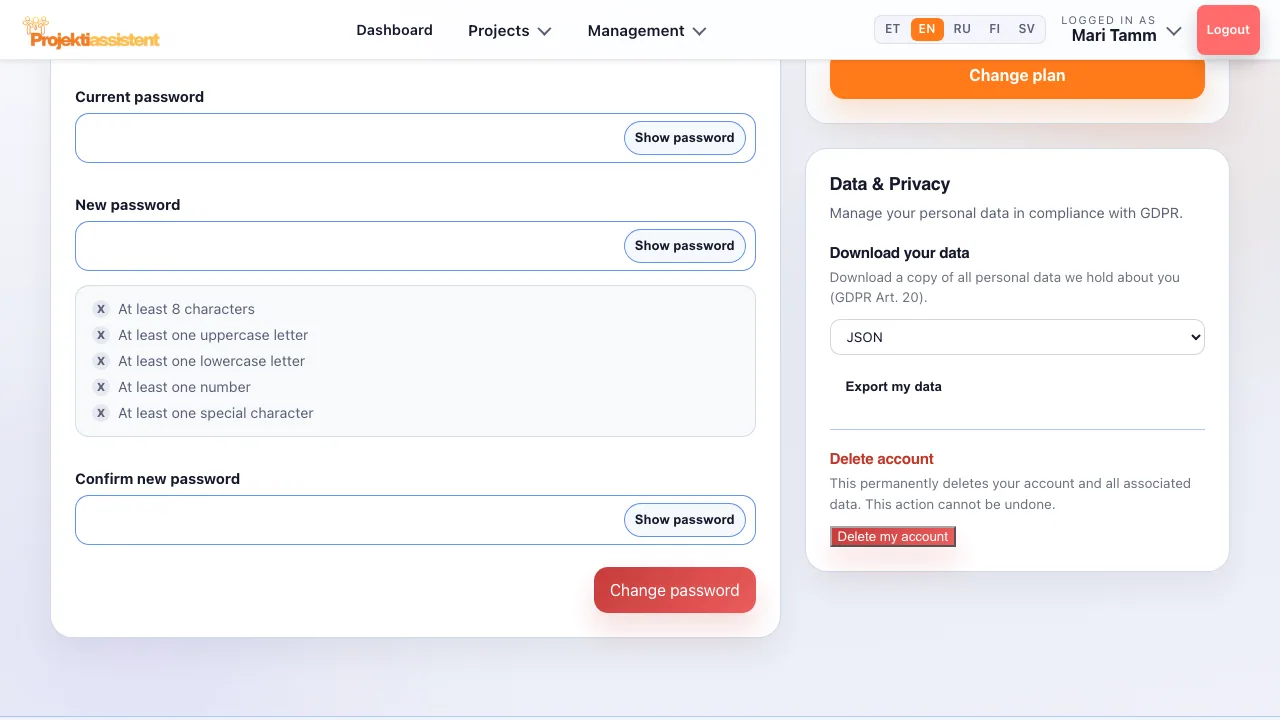
Your data stays yours
In the profile's "Data and privacy" section you can download a copy of all personal data stored about you and permanently delete the account with its related data yourself — not something you have to request through support.
Frequently asked questions
Where is the data stored?
The platform runs on a PostgreSQL database and all traffic is encrypted. A fuller description of data processing is in the privacy policy.
Can I get my data out?
Yes. "Export my data" downloads a copy of all personal data stored about you, and "Delete my account" permanently deletes the account and related data after confirmation.
Who can see my projects?
Only you and the people you have shared them with, within their permission level. On the Business plan a role profile can restrict modules further, and workspaces keep an organisation's projects together.
Is the audit log sufficient for compliance?
On the Business plan the audit log records the project's major changes with who made them and when, version changes can be restored, and the organisation's audit view suits compliance checks and audit preparation. The requirements of a specific regulation are still worth reviewing with your own compliance specialist.
How do I do this in the app?
Step-by-step instructions with the button and field names are in the user guide.
What Projektiassistent does for you
Project plan generator
Describe the project in your own words — the AI drafts a structured plan.
→🛑Decision readiness
Decision log, baseline and milestone approvals — who, what and when.
→🧩Tasks and work breakdown
Break the project down: tasks, subtasks, owners and effort.
→📊Gantt chart
Schedule, dependencies and critical path — built from your plan.
→🔀Kanban board
Task flow in columns — the same tasks as in the plan.
→🧭Methodologies
Waterfall, Scrum, Kanban, Hybrid, PRINCE2 or Simple project.
→👥Resource planning
Who is overloaded and who is free — before a deadline slips.
→⚠️Risk analysis
Risk register: impact × probability, risk score and mitigation plan.
→💶Project budget
Cost lines, VAT and free balance in real time — ready for reporting.
→📊Reporting
A status summary for management in seconds, the document as PDF/DOCX.
→🗂️Project portfolio
Every project on one screen — an aerial view, not a magnifying glass.
→🤝Team collaboration
Share the project by invitation — Viewer, Editor or Admin.
→🧠AI project manager
Plan, tasks and summary — recommendations, what-if and notes on Business.
→🔌Integrations
API tokens, webhooks, Slack, Teams and a calendar feed (Business).
→Try a secure project environment
14-day free trial — no credit card required.
Start for free →