
Your workflow, our data
A new tool that expects the whole team to move house mostly goes unused. On the Business plan Projektiassistent comes to where the work already happens: project event notifications into Slack and Teams, task deadlines into the calendar, data into your own systems over the API and webhooks.
Four ways to connect
You set up integrations under account menu › Integrations and in the "Integrations and webhooks" block of the project page.
API tokens
Personal tokens with chosen scopes (e.g. read/write access to projects, tasks or risks) and an expiry date; sent in the Authorization: Bearer header. The app includes an API v1 quick reference.
Project webhooks
Choose an event and a target URL — project events are sent to your system. The delivery history shows the response codes.
Slack and Teams
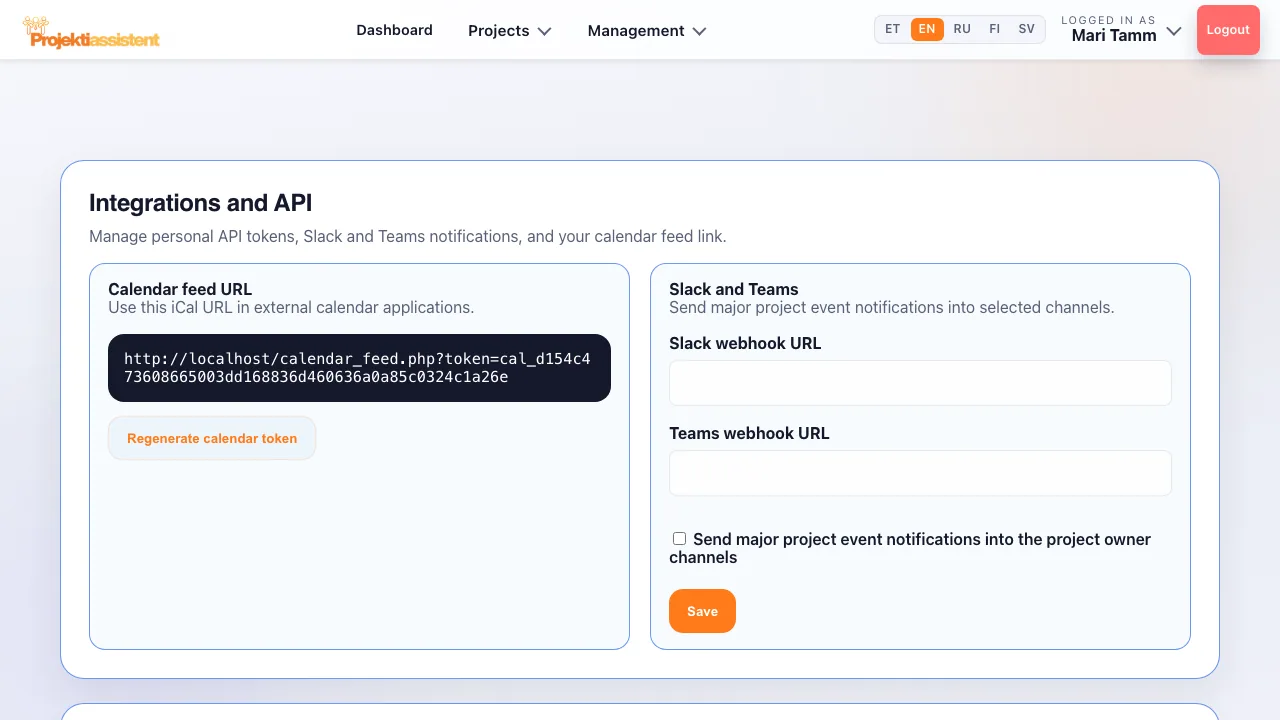
Through an incoming webhook URL, notifications about major project events go into the project owner's channels.
Calendar feed
An iCal link to add to Google Calendar, Outlook or Apple Calendar as a subscribed calendar — task deadlines appear in your calendar.
An integration must not be an open door
Every interface is separately constrained: an API token only has the scopes you grant it, and a calendar or token link can be invalidated at any moment.
- Scoped tokens
Each token gets only the chosen scopes and an expiry. The token is shown only once, and one you no longer need can be revoked.
- Secret token
Every project webhook has a secret token (generated automatically if left blank) that the receiver can use to identify the sender.
- Retries and log
A failed delivery can be resent with the "Retry" button, and the retry queue can be processed immediately. API usage and limits are shown under "API audit and throttling".
What people actually do with it
Most integrations solve one thing: information should not live somewhere nobody signs in to every day.
Frequently asked questions
Are integrations included in every plan?
No. API tokens, project webhooks, Slack and Teams and the calendar feed are on the Business plan. On Standard and during the trial the Integrations menu item is not available.
Does setting up Slack or Teams need a developer?
No. Create an incoming webhook in Slack or Teams, paste its URL into the settings, tick the project event notifications and save.
What if my system is down when a webhook fires?
The webhook delivery history shows the response codes, and a failed delivery can be resent with the "Retry" button. Pending items in the retry queue can be processed immediately.
Is the calendar feed public?
No. The link contains your calendar token. If it falls into the wrong hands, press "Regenerate calendar token" — the old link stops working.
How do I do this in the app?
Step-by-step instructions with the button and field names are in the user guide.
What Projektiassistent does for you
Project plan generator
Describe the project in your own words — the AI drafts a structured plan.
→🛑Decision readiness
Decision log, baseline and milestone approvals — who, what and when.
→🧩Tasks and work breakdown
Break the project down: tasks, subtasks, owners and effort.
→📊Gantt chart
Schedule, dependencies and critical path — built from your plan.
→🔀Kanban board
Task flow in columns — the same tasks as in the plan.
→🧭Methodologies
Waterfall, Scrum, Kanban, Hybrid, PRINCE2 or Simple project.
→👥Resource planning
Who is overloaded and who is free — before a deadline slips.
→⚠️Risk analysis
Risk register: impact × probability, risk score and mitigation plan.
→💶Project budget
Cost lines, VAT and free balance in real time — ready for reporting.
→📊Reporting
A status summary for management in seconds, the document as PDF/DOCX.
→🗂️Project portfolio
Every project on one screen — an aerial view, not a magnifying glass.
→🤝Team collaboration
Share the project by invitation — Viewer, Editor or Admin.
→🧠AI project manager
Plan, tasks and summary — recommendations, what-if and notes on Business.
→🔒Security and GDPR
Access control, encrypted transport and GDPR rights.
→Connect Projektiassistent to your workflow
14-day free trial — no credit card required.
Start for free →